tidwright adds data-testid to your source by one standard: a tool makes the safe edits and AI decides the rest through a checked plan. A parser places every edit, your build must stay green or all files are restored, and nothing is written without approval. QA then writes Playwright tests on those ids.
01With vs without
With and without tidwright
How a team works before a standard exists, and after.
btn1, submitBtn); tests break on every refactor.<area>-<element>-<type>, e.g. login-submit-button, enforced by lint.e2e/TESTIDS.md catalog and uses getByTestId only./tidwright:audit catches it before the run, along with sleeps, .only and credentials in specs.Before and after
- <button onClick={save}>Save</button>
+ <button data-testid="order-form-save-button" onClick={save}>Save</button>
- <input name="customerName" />
+ <input data-testid="order-form-customer-name-input" name="customerName" />
Real output of scan --write on a file named OrderForm.tsx. The Save button, whose name comes only from its text, is listed for review unless you pass --accept-text.
02How it works
How it works
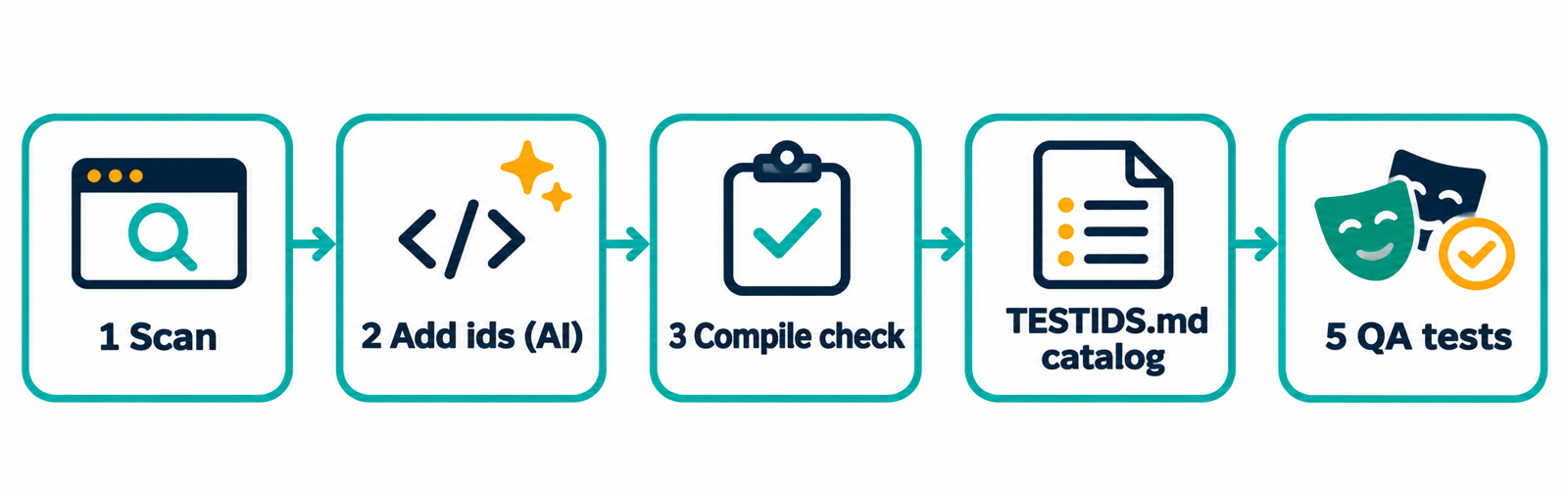
Five steps. Nothing is written without approval.
- ScanThe project's parser locates every element a test would touch (buttons, links, inputs, forms) and proposes a standard name. Only a narrow subset is marked safe; the rest is a review queue with the reason beside each line.
- Add idsThe tool writes the safe subset. AI decides the rest (elements in loops get a stable
${key}) through a validated plan. A person approves before anything is written. - Verify in one transactionEdited files are re-parsed, typecheck/build must stay green and, with
--smoke, a browser check confirms ids are unique and present. If a step that ran fails, all files are restored. - Catalog
e2e/TESTIDS.mdis generated for QA on every write run, stating how each id is defined. - QA writes testsSpecs use
getByTestId; the audit catches ids a spec uses that the source no longer defines.
03What you gain
What you gain
What the team has afterwards that it did not have before.
Standard and lint
A closed list of types (button input select row modal toast page…); no vague words such as btn, div, red; no bare numbers — use a business id.
Per-component recipes
recipe modal orders-delete returns the fixed id set for modal, table, form, tabs and toast, so nobody redesigns it on every page.
Locator helpers
modal(page,"orders-delete").confirm and table(page,"orders").row(id) match the recipes.
Duplicate-id guard
Templates for vitest/jest and a Playwright fixture that fail when the same data-testid appears twice in the DOM.
Auditor
Flags sleeps, .only, credential literals, CSS/XPath/text selectors and ids the source does not define.
Host safety
The playwright.config.ts template refuses non-local hosts unless allow-listed, so a run cannot hit production by accident.
04The standard
The id standard
<area>-<element>-<type> · kebab-case ASCII · the last segment is a type from a closed list · each id defined once (dynamic ids too).
<n> = the name you give it)<n>-modal · -title-text · -close-button · -confirm-button · -cancel-button · -error-banner<n>-form · -submit-button · <form>-<field>-input · …-error<n>-table · -row-${id} · -cell-${id}-${col} · -sort-button-${col} · -empty · -loading · -error<n>-tab-${key} / -panel-${key} · -trigger-button / -item-${key} · -prev-button / -next-button · <action>-success-toast05Safety
Safety by design
Nothing is written unless asked
scan is read-only. Writing needs --write, and the AI workflow shows a dry run and asks first. Files with uncommitted changes are skipped.
A deliberately narrow auto-set
Only native elements with a trustworthy name that are not repeated, spread-over or rendering nothing. Everything else is listed with its reason.
Positions come from a parser
The project's own parser (TypeScript, Vue, Svelte, Angular, parse5), so a string, regex or comment is never mistaken for an element. No parser means list only, never write.
Build stays green or files are restored
--write requires --verify, which must pass before and after. If the browser check is not run, the report says NOT run.
A cloned repo cannot run commands
A verify command that came only from a file in the repository is not run until a person approves it.
Adoptable in legacy code
lint --write-baseline accepts today's problems, then CI fails only on new ones.
06Evidence
Evidence
Re-runnable with node tools/corpus-check.mjs on nine open-source apps pinned to a commit (RealWorld Conduit in Vue / SvelteKit / Angular / React, elk, ngx-admin, shadcn-svelte, excalidraw, vercel/commerce).
- The tool runs on real code without crashing.
- What it writes is a pure attribute insertion (removing the added attributes returns the original bytes).
- Added ids follow the standard and do not collide.
- That the edited apps still compile (use
--verifyin your project). - That the proposed names are the best ones.
- That tests written on these ids are less flaky.
07Limits
Limits, stated plainly
- Names come from attributes, i18n keys, routes and handlers — not from business knowledge. Anything without a trustworthy name goes to AI or a person. Dry-run one feature folder and read the diff before
--write. - The project's own parser is required. Without it the tool lists candidates but does not write.
- What static analysis cannot know (portals, conditional branches, dynamic components) is left to the browser check and to a person reading the diff.
- No benchmark yet shows it beats the three source skills, or that tests written on these ids are less flaky.
- Works with Codex and Cursor through
AGENTS.md, but has not yet been exercised in Codex or Cursor themselves.
08Get started
Get started
Full steps for each agent are in the repository README (ask the team for the repository URL).
Claude Code
Install the plugin, then use the three commands below.
Codex
Reads AGENTS.md at the project root, which carries the workflow and the exact commands.
Cursor
Copy .cursor/rules/tidwright.mdc; it points the agent at AGENTS.md.
# install
/plugin install tidwright@tidwright-marketplace

# discover the repo → write its profile → scaffold (with approval)
/tidwright:init

# add ids to one feature, then publish the catalog
/tidwright:testid src/features/orders

# audit specs
/tidwright:audit